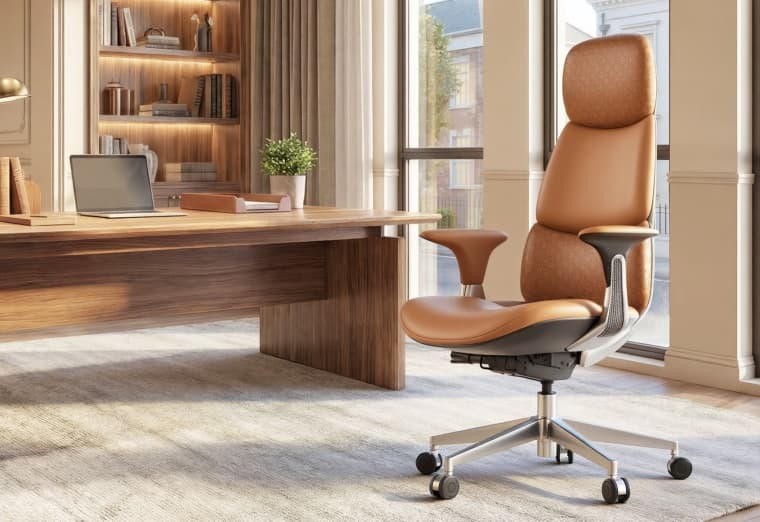
How to Choose an Adjustable Ergonomic Chair Based on Your Body Type and Work Style
For office workers who spend long hours at their desks, the quality and comfort of their office chair significantly impact daily productivity. Guidelines from the U.S. Occupational Safety and Health Administration (OSHA) regarding ergonomic office chairs highlight that adjustability allows users to tailor settings to their specific physical characteristics; this ensures proper bodily support and helps alleviate the discomfort associated with prolonged sitting.
However, many people encounter a common issue when purchasing an ergonomic chair: a chair that feels incredibly comfortable for someone else may feel completely unsuitable for them.

The reason is simple: an ergonomic chair is not necessarily better simply because it is more expensive or packed with features. A truly excellent ergonomic chair must be adjustable to suit the user's specific body proportions, sitting habits, and work style. Therefore, when selecting an adjustable ergonomic chair, the most important question is not "What features does this chair have?" but rather: "Can this chair be adjusted to fit my body and the way I work?"
What key adjustment features should you look for when choosing an ergonomic chair?
A suitable ergonomic chair should possess the following characteristics: a height-adjustable backrest or lumbar support, adjustable seat height, a stable base, customizable armrests, and a recline function that supports various sitting postures. Additionally, if the chair allows for a significant recline, the curvature and adjustability of the headrest become important factors.
The U.S. Occupational Safety and Health Administration (OSHA) also recommends checking that your feet rest flat on the floor or a footrest, your lower back makes contact with the lumbar support, your shoulders remain relaxed, and the armrests do not prevent the chair from being positioned close to the desk.
Generally speaking, an ergonomic chair suitable for prolonged office use should prioritize the following aspects:
1. Seat Height and Seat Depth: Determining Proper Leg and Pelvic Positioning
Adjusting the seat height is the fundamental first step in setting up an ergonomic chair and a crucial factor influencing sitting posture.
The correct seat height should ensure that:
- Both feet rest naturally on the floor;
- The knees maintain a comfortable angle;
- The thighs receive adequate support;
- The body does not slide forward due to the height setting.
If the seat is too high, the user's feet may not fully touch the ground. In an attempt to find stable support, the body tends to shift forward, preventing the back from resting properly against the backrest.
Conversely, if the seat is too low, the angle of the legs changes, making the user prone to slouching (rounding the chest) or slumping (collapsing the lower back). Beyond height, seat depth is equally important. Some users find that while the backrest feels great, their legs become uncomfortable after sitting for extended periods; this issue often stems from an incorrect seat depth.
The S9 Pro ergonomic chair features optimized seat dimensions to accommodate various body types and supports multiple adjustments—including seat height—allowing users to find the most comfortable sitting position tailored to their specific body proportions.
2. Lumbar Support: The Key Feature Distinguishing Ergonomic Chairs from Standard Office Chairs
Lumbar support is one of the most critical features of an ergonomic chair, as the human lumbar spine naturally possesses a specific curvature. While standing, the lumbar spine maintains this natural curve; however, during prolonged periods of sitting, a lack of proper backrest support can cause the body to lose its natural posture, potentially leading to lower back injury.
Effective lumbar support typically meets the following criteria:
- Users can manually adjust the position of the lumbar support to suit their sitting posture and body type.
- It conforms to the contours of the body.
- It automatically adapts to changes in the user's sitting posture.
3. Headrest Adjustment: Don't Overlook Neck Support
For office workers who spend long hours at a computer, proper neck support is essential—especially during activities such as:
- Video conferencing;
- Reading documents;
- Extended design work;
- Leaning back to rest.
If the headrest is positioned or angled incorrectly, it fails to provide the necessary support for the head and neck and can actually cause further discomfort.
Therefore, a high-quality ergonomic chair headrest typically offers:
- Height adjustment;
- Depth (forward/backward) adjustment;
- Angle adjustment.
These features allow users to customize the fit based on their specific neck position.
The S9 Pro features a 3D adjustable headrest that allows the support angle to be tailored to the user's head position, ensuring the chair accommodates a wide range of heights and sitting postures.
4. Adjustable Armrests: A Key Factor for Shoulder and Arm Comfort
Armrests are a crucial feature of ergonomic chairs; their height and angle directly affect shoulder posture. If armrests are too low, users may be forced to constantly shrug their shoulders or reach forward to operate the keyboard and mouse. Conversely, if armrests are too high, shoulder muscles can easily become tense over prolonged periods.
Therefore, OSHA recommends that office chair armrests help users maintain a natural arm position and keep their shoulders relaxed; consequently, multi-directional adjustable armrests are essential for those who spend long hours working at a desk.

The S9 Pro features 6D ergonomic armrests that support a wide range of adjustments—including 360° rotation, forward and backward tilting, height adjustment, and lateral and longitudinal positioning—providing users with superior arm support during work, reading, and other activities.
Choose an ergonomic chair based on body type.
1.What should taller users look for?
For taller individuals, the biggest challenge is often inadequate seat dimensions. When selecting an ergonomic chair, focus on the following:
- Backrest height;
- Seat depth;
- Headrest adjustment range;
- Maximum weight capacity.
If the backrest is too low, the shoulders and back will lack sufficient support; if the seat depth is insufficient, the thighs may be left unsupported for extended periods.
Therefore, taller users are better suited to ergonomic chairs that offer a wider range of adjustments.
2.What should users of smaller stature look for?
When purchasing an office chair, people of smaller stature often encounter the following issues:
The chair is too large. For example:
- The seat height cannot be lowered sufficiently;
- The seat depth is excessive;
- The lumbar support is positioned too high.
Therefore, users of smaller stature should prioritize:
- Greater flexibility in height adjustment;
- Adjustable seat depth;
- Adjustable headrest;
- Armrests that can be lowered.
Ergonomic design is only effective when the chair truly fits the user's body proportions.
3.What should larger users look for?
For larger users, stability is just as important as comfort.
Key factors to consider include:
- Seat width;
- Base structure;
- Gas lift class;
- Maximum weight capacity.
The S9 Pro features a stable structural design and supports a maximum weight capacity of 330 lbs, providing a reliable experience for users of various body types.
Choose an ergonomic chair based on your work style.
1.For users who work at a computer for extended periods:
If your workday lasts 6–10 hours, prioritize long-term support when selecting an ergonomic chair.
Focus on:
- Dynamic lumbar support;
- Seat cushion comfort;
- Backrest adjustability;
- Armrest adaptability.
This is because, during prolonged use, even minor mismatches become magnified.
2.For those working from home
Working from home often involves transitioning between various activities:
- office work in the morning;
- meetings in the afternoon;
- and reading or entertainment in the evening.
- Therefore, a versatile ergonomic chair is the ideal choice.
Features such as adjustable backrest angles, headrests, and armrests allow a single chair to meet a wide range of home-use needs.
3.Gaming and Entertainment Users
Gamers typically remain seated for extended periods while frequently shifting their body position.
Key considerations include:
- Stability;
- Recline function;
- Head support;
- Arm support.
An ergonomic chair suitable for both work and entertainment eliminates the need to switch chairs between different activities.
How does the S9 Pro meet the diverse needs of users?
The S9 Pro ergonomic chair features a design with multiple adjustable elements, allowing users to customize their seating position based on their unique physical characteristics.
These features include:
- Adjustable seat height;
- Dynamic lumbar support;
- 3D adjustable headrest;
- 6D multi-functional armrests;
- Adjustable backrest angle.

For individuals who spend long hours working, studying, or using a computer, a suitable ergonomic chair not only enhances comfort but also helps create a more scientifically sound work environment.
FAQ: Common Questions About Choosing an Ergonomic Chair
1. How do I determine if an ergonomic chair is right for me?
To determine if an ergonomic chair suits you, you must first understand your own physical characteristics—such as height, weight, and leg length. You should then select a chair by considering these measurements alongside features like seat height, seat depth, lumbar support positioning, armrest height, and the availability of adjustable settings.
2. What features should an excellent ergonomic chair have?
An excellent ergonomic chair should typically feature height adjustment, lumbar support, seat depth adjustment, headrest adjustment, and armrest adjustment.
3. Is lumbar support important in an office chair?
Yes. Lumbar support helps the chair conform better to the body's curves and is an important component of an ergonomic chair.
4. Can one ergonomic chair fit everyone?
No. Different users have varying heights, body types, and work habits, so an adjustable design is essential.
5. How long should you sit in an ergonomic chair?
Even when using an ergonomic chair, it is recommended to change your sitting posture and stand up regularly to avoid maintaining a fixed position for extended periods.